I sat down tonight and decided to tinker with a new tool called Ansible Doctor, and it struck me that maybe that was a good topic for a post. I also realized, however, that it might make sense to make another post laying out how I go about this sort of stuff, partially so I can just link to this in the future when I make those posts, and partially in the hope that it helps someone else down the road.
Discovery
All of us learn new things at some point in our lives. Some of us (like me) enjoy that process, and some do not. I've built my career on, among other things, knowing how to figure out what I don't know. For a lot of people, "Figuring stuff out" usually means doing whatever the thing you're trying to figure out is, often multiple times.
Rote Memorization stands the test of time as the most commonly-used method for building the muscle memory required to Do The Thing™, but early in my career many years ago I decided that Rote Memorization wasn't for me, and that I learned better when I truly understood what I was looking at versus when I simply built the memory to regurgitate facts and answers on command. To build that understanding I needed a process for learning, and I call that process discovery.
Discovery is probably a more dramatic word than the process really needs, but I wanted something that I could use to categorize notes and scratchpads, group together those exploratory exercises, and to where I could build things that I knew probably weren't production-ready and wouldn't pass the smell test, but where I could prop them up and explain that they were, essentially, fishing expeditions. But a key part of that fishing expedition is knowing what you're fishing for.
That is what the discovery process provides me: a framework for defining what I'm going to tinker with, why I'm doing it, and what I hope to get out of doing it. These are all key to understanding the things I learn, versus memorizing them.
The Discovery Framework
I maintain a "parking lot" style list of things I want to explore in Jira. The things on that list might be tools, they might be protocols, design patterns, certifications, or anything else that catches my eye.
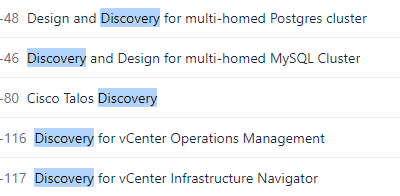
Once I pick something off that list, the discovery framework is fairly simple. First, I create a new document in my personal knowledge base (or in a git repository) and answer four questions:
- What do I know about the thing now?
- What am I aware of about it that I don't know?
- How am I going to go about the discovery process?
- What am I looking to get out of doing this?
The goal of these questions is to take the abstract concept of The Thing™ and begin forming a more concrete understanding in my mind of what it is, why it exists, how it is used, and why it might be interesting to me.
Once I've done that, the next step is to collect general information. It might be tempting to start building right away, but there is wisdom in the phrase "measure twice, cut once" and it applies here: finding information about The Thing™ and gaining exposure to it before you start to build pays off in exponential time savings, and a much better understanding of what to do and how to do it once you do begin. That information often takes the form of links to things like the official documentation, blogs, videos, and almost always a significant number of stackoverflow posts. Those go in a section called links and anything else I find during the process is added here.
Here's an example from several years ago when I was looking at a couple of things related to Ansible and Jenkins:
Links

Ansible → Jenkins Integration
    * https://www.redhat.com/en/blog/integrating-ansible-jenkins-cicd-process
    * https://github.com/ansible/tower-cli
        * Use tower-cli in a Jenkins shell step
        * Phased out, replaced by awx CLI
    * https://github.com/ansible/awx/tree/devel/awxkit/awxkit/cli/docs
        * AWX CLI
    * https://plugins.jenkins.io/ansible-tower/
    * https://medium.com/@khandelwal12nidhi/integrate-ansible-with-jenkins-e898e94be677

Ansible - Documenting Roles
    * https://github.com/ansible/proposals/issues/19#issuecomment-523413299
    * https://github.com/ansible/proposals/issues/19#issuecomment-547648529
    * https://pypi.org/project/ansible-autodoc/
Once I've done that, only then do I start building. I go back to the four questions I asked to start; the third is "How am I going to go about the discovery process?". The answer to that informs how I start building. For example, here was my answer to that for the Ansible example above:
How am I going to go about the discovery process?
1. Build a jenkins pipeline that runs an Ansible playbook
2. Document that playbook's associated role with ansible-autodoc
That gives me a pretty clear plan to start building; next it's just a matter of going to do that.
The Unknowns
There's a caveat to all of this: it is predicated on the assumption that I will encounter things that I don't know. Not only that, but many of those things will be things I didn't even know to think about. For example, I may discover that I need some supporting infrastructure or that I have to follow some design pattern that is enforced by the tool. I may discover that the thing I want to do doesn't work at all and I have to do it another way. I may discover that what I expected about how a tool works is completely wrong, or be exposed to new paradigms I've never seen before and don't understand.
This is precisely the point of Discovery.
If I could figure out everything I needed to know without doing something, there would be no need to learn this stuff. You could just go read the documentation whenever it was time to do something and do it perfectly, sight unseen. There are many tools out there like that, and that's great! But this framework is designed to acknowledge and exercise a few simple truths about how I (and likely others) learn:
- You don't know what you don't know until you do something.
- You never understand something the first time you do it, and usually not the second either.
- You never do something correctly the first time.
Additionally, it is designed to sort information about The Thing™ into one of a couple of categories:
- Known Knowns
- Known Unknowns
- Unknown Unknowns
Known Knowns are things we know. Either because we understand them, or because we've memorized them, but regardless of why we know them we do. Known Unknowns are things we know about, but may need to brush up on by reading the documentation to get them right.
For example I know that sshd has a configuration file where I can tweak the behavior of SSH on a host, but I don't know the fields from memory. I'd have to go and read the documentation to actually make those changes. Again, regardless of what they are, by using this process I can sort that information into a category of stuff that I really don't need to worry about. It's there, I know it's a thing, and when the time comes I'll fish up some documentation and move on with life.
The focus of learning is the Unknown Unknowns. These are the things that I don't know, and that I have no idea even exist. You don't have any way of knowing that these things are out there until you just go and Do The Thing™ and encounter them. And as you do, you can go and read, experiment, tinker, and ultimately learn about them so that when the time comes to do it in the wild (at work, or for a client) you know that those things are there and you can manage them. And if you're diligent, you have pages of notes about them from doing this process.
Again, most of the world probably doesn't dive this deep into learning and that's fine. For most, it's enough to probably just throw hours at a thing doing it over and over again until they've memorized it, then go do it in the wild once or twice and read the documentation when they get lost and move on. That's okay, and if they can accomplish their goals by doing that then I'm happy for them. Part of my identity is a natural curiosity, and for me that means understanding and learning the ways that we do things, and aspiring to imitate and then improve upon them.
Example
I'll close with an example of some notes I took doing discovery for Terraform years ago. The content of this may or may not stand the test of time as Terraform changes, but the structure of it should illustrate how discovery works:
Questions:
What do I know about the thing now?
- Terraform is for deploying infrastructure in an automated way.
What am I aware of about it that I don't know?
- How do you manage code?
- How do you collaborate?
- How do you define infrastructure (semantics/syntax?)
- How do you run terraform?
How am I going to go about the discovery process?
- Built terraform lab box (RHEL 7, 4 CPU/6GB RAM/100GB Disk)
- download/unzip terraform executable/binary (and place in path)
- create directory (called 'module')
- create
main.tfinside it - run
terraform plan - run
terraform apply - if providers (plugins) are required, add their install code to
<user home>/.terraformrcand runterraform init
What am I looking to get out of doing this?
- Figure out how to use terraform
- Figure out what areas I need to focus on for continuing to learn it
- Figure out best practices, even if I can't do them yet
Links
- https://www.terraform.io/docs/enterprise/before-installing/reference-architecture/vmware.html
- https://www.terraform.io/docs/enterprise/before-installing/reference-architecture/index.html
- https://www.terraform.io/docs/enterprise/before-installing/rhel-requirements.html
- https://linuxacademy.com/hands-on-lab/8c0ffb05-fb39-43a4-a02a-51ef4ecdd8e4/
- https://github.com/Derek-Ashmore/terraform-hands-on-lab/blob/master/terraform/deployments/terraform-lab/lab.tf
- https://www.azuredevopslabs.com/labs/vstsextend/terraform/
- https://www.terraform.io/docs/commands/cli-config.html
- https://registry.terraform.io/providers/hashicorp/local/1.4.0
- https://learn.hashicorp.com/terraform/modules/modules-overview
- https://www.terraform.io/docs/enterprise/before-installing/reference-architecture/index.html
- https://www.terraform.io/docs/cloud/guides/recommended-practices/part1.html
Notes
main.tf output:
[usr@tfm-lab tfm-discovery]$ pwd
/home/usr/tfm-discovery

[usr@tfm-lab tfm-discovery]$ cat main.tf
resource "local_file" "foo" {
    content     = "foo!"
    filename = "./foo.bar"
}
terraform apply output:
[usr@tfm-lab tfm-discovery]$ terraform apply

An execution plan has been generated and is shown below.
Resource actions are indicated with the following symbols:
  + create

Terraform will perform the following actions:

  # local_file.foo will be created
  + resource "local_file" "foo" {
      + content              = "foo!"
      + directory_permission = "0777"
      + file_permission      = "0777"
      + filename             = "./foo.bar"
      + id                   = (known after apply)
    }

Plan: 1 to add, 0 to change, 0 to destroy.

Do you want to perform these actions?
  Terraform will perform the actions described above.
  Only 'yes' will be accepted to approve.

  Enter a value: yes

local_file.foo: Creating...
local_file.foo: Creation complete after 0s [id=4bf3e335199107182c6f7638efaad377acc7f452]

Apply complete! Resources: 1 added, 0 changed, 0 destroyed.

[usr@tfm-lab tfm-discovery]$ ls
foo.bar  main.tf  terraform.tfstate

[usr@tfm-lab tfm-discovery]$ cat foo.bar
foo!
.terraform.rc contents:
[usr@tfm-lab tfm-discovery]$ cat ~/.terraform.rc
provider "local" {
  version = "1.4.0"
}
Discovery Questions:
What is terraform?
- "Use Infrastructure as Code to provision and manage any cloud, infrastructure, or service"
- It's a tool to provision infrastructure based on codified specifications
What are the use cases?
- Infrastructure as Code
- Fast recreates
- Reusability
- Disaster Recovery
What is the Terraform standard architecture?
- For community, a server with the client installed and which stores configuration, or else has availability to pull configuration from SCM.
- Alternatively, an ephemeral container with the client installed
- https://www.terraform.io/docs/cloud/guides/recommended-practices/part1.html
What are the system and infrastructure requirements for terraform?
- Enterprise req's - N/A
- Terraform can be deployed in different modes (standalone, clustered, etc). See pre-install checklist for details.
- https://www.terraform.io/docs/enterprise/before-installing/index.html
- Community req's
- OS
- Debian 7.7+
- Ubuntu 14.04 / 16.04 / 18.04
- Red Hat Enterprise Linux 7.2+
- CentOS 7+
- Amazon Linux 2016.03 / 2016.09 / 2017.03 / 2017.09 / 2018.03 / 2.0
- Oracle Linux 7.2+
- Hardware
- At least 40GB of disk space on the root volume
- At least 8GB of system memory
- At least 2 CPU cores
- Network
- https://www.terraform.io/docs/enterprise/before-installing/network-requirements.html
- OS
What are the limitations of the free version?
- No GUI
- No RBAC
- No enterprise features
What does the paid version cost?
- $30/mo/user for basic paid (cloud) version
What are the on-prem vs hosted options?
- on-prem
- Use terraform CLI tool on a host
- Processes .tf files and makes API calls to providers to build infra.
- Use terraform CLI tool on a host
- hosted/cloud
- Use terraform cloud
- Provides GUI + enterprise features
- Connects to cloud providers
- Does not connect to private networks
Does this support a goal of infrastructure as code?
- Yes
- Some overlap w/ Ansible. Will make sense to define a domain for each tool (infra provisioning vs config management vs software/service provisioning vs drift detection/resolution / etc)
What kind of maintenance/upkeep is required?
- Version upgrades
- OS Management
- Provider installation/version upgrades
- Code management