This is the continuation from Disaster Recovery, Hold the Recovery (Part 1). In this part, I'll talk about some of the steps I took to start recovering and improving my systems after the events of Part 1.
Initial Recovery
Following a series of cascading failures, I had discovered some severe mis-configurations in my storage that meant my environment was at risk of total loss. I'd ordered a NAS and configured 40 TB of storage across four disks as a new RAID 5 array, and connected it to vcenter as a new datastore. With everything hooked up my goals were relatively straightforward:
- Protect and prevent against data loss, as much as possible
- Restore service as close to it's prior state as possible
- Improve the state where possible given the risk and complexity constraints
I was concerned that powering anything else on might cause issues so I wanted to be careful. While bad sectors don't traditionally spell disaster, I'm not comfortable enough with storage technology to be positive that I knew what I was doing, and it was already demonstrated by the surprise RAID 0 disk that the environment I was working in wasn't the one I thought I had built. So, my first action was to migrate every single host that I could off of the local-hdd01 direct-attached (RAID 0) datastore onto the NAS (RAID 5) datastore. Happily, most of the hosts moved without issue and could be powered back on once they had migrated. There were only three hosts which wouldn't move, presumably due to errors on the drive making their data unreadable.
That makes sense; RAID 0 is a collection of drives organized into one virtual drive, but each disk is still independent of the others. With a readable, (mostly) functioning array, seven out of the eight disks would be readable and could have their data migrated off. Anything hosted on the eighth disk would likely be gone.
Unfortunately for me, one of the things stored on the eighth disk was my postgresql server. In case you don't remember from Part 1, this server was old, it had not been properly maintained and updated, and it was used by nearly everything I had, including other critical infrastructure components, including:
- My source control server
- My knowledge base
- Nextcloud (x2)
- A CVE scanning engine
- HomeAssistant
- A few kubernetes applications
- My IPAM
- My binary repository
- My automation orchestrator
- Several databases for custom applications I had built (maybe these are worth a post one day)
Postgres was easily one of the most critical pieces of infrastructure I had, behind my router itself. I retried the migration a few times, but eventually had to moved on to investigating how much I could save, and it quickly became apparent that I had lost a significant portion of the data. I poked around a bit and discovered that much of the data loss appeared to be in the metadata associated with those files. I found a tool called foremost which can rebuild files after they've been deleted and was actually able to recover much of the raw data on the drive. Unfortunately, foremost dumps everything into a directory; it does not (cannot?) preserve the folder structure when it recovers data. Since the folder structure is important for the postgres data directory, this wasn't really that useful.
At the same time, I had begun to dig through the hosts that had been powered back on and identified that most of the data was still intact. For example, my source control server (Gitea) still had all it's repositories right where it expected them, it had just lost the database connection which supplied metadata for displaying those repositories through the web interface. A bit more searching led me to the conclusion that I probably could dig around and recover the database, but it would easily take me weeks, if not months. I didn't really care about non-critical stuff like game saves, and I had verified that the critical data was secure, so I decided the best thing would be to call postgresql a loss and start fresh.
Planning Improvements
Once the migrations had completed as best they could, and I had taken stock of what wouldn't be salvageable it was finally time to start putting things back in order and looking at how to improve. Given that this was a home lab and not a revenue-driving business, and that I was on vacation and had time to spare, and had lots of things I needed to improve, I decided that the best thing to do would be accept a lengthy downtime in the interest of fixing the problems I had, rather than to just restore everything to how it had been.
The immediate issues I had identified to fix were:
- Having services (especially critical ones) which were not properly managed, up to date, or backed up.
- Having critical infrastructure run in ways that it was susceptible to failure in unrelated services, creating complex dependency chains (such as running DNS servers on virtual hosts with no HA).
- Not having visibility and monitoring of what was happening in the environment.
- Restoring critical services such as source control and my knowledge base.
DNS and IPAM
My first improvement was to DNS and IPAM. I'd been running Netbox for IPAM, with custom python scripts and git hooks which allowed me to trigger a DNS update whenever I added a new host in IPAM. It worked flawlessly and was fully automated, but it was complicated and that lent itself to a lack up maintenance and updates.
Additionally, I wasn't really getting much value from having IPAM. My network includes three physical sites, one AWS VPC, and a few SaaS tools that inject or receive data to the environment, so the original intent of IPAM had been to document and manage it all, but the reality is that only one of those sites sees changes to it's host configuration or infrastructure. The SaaS tools are unmanaged, and the remaining sites have seen one change in three years cumulatively.
At the same time, Netbox was in the category of things that hadn't been on a regular update schedule and was incurring more effort to manage than was really justified, so the first decision I made was to get rid of it wholesale and simplify by using DNS as my system of record for IP Address Allocation. The only real loss for me here was that I didn't have a convenient web interface showing me available vs allocated IP space any more, but that's really not that important to me since IP space isn't something I'm struggling with.
On the DNS side, I had been running CoreDNS after switching away from Bind9 some time ago. CoreDNS is nice, and it's a great tool, but it was built primarily for Kubernetes. Using it standalone is fine, but it just didn't have the flexibility or feature set, or the support from widespread automation tools to do what I needed. As I mentioned above, automating basic DNS updates with CoreDNS involved a collection of bespoke scripts and hooks that all interconnected in a really complex way. Since all I'm really doing with DNS is host lookups, I decided to move back to Bind which has wider support among automation tools for simple update-type tasks.
Perhaps the biggest improvement was that I moved my DNS server off of a VM, to a raspberry pi. This would prevent issues like I had seen before, where I couldn't reach any of my systems due to DNS being offline. I also added a second DNS server PI for redundancy, in case the first fails. Both are rack-mounted and POE enabled, which lets me fit them in (physically) with the rest of my infrastructure rather than having to run them off on the side of a desk or something or run wires across a room. If something happens and there's a hardware failure, I can simply swap the SD card to a new board and plug it in. With the second Pi still functioning, this should eliminate downtime due to DNS servers not being online.
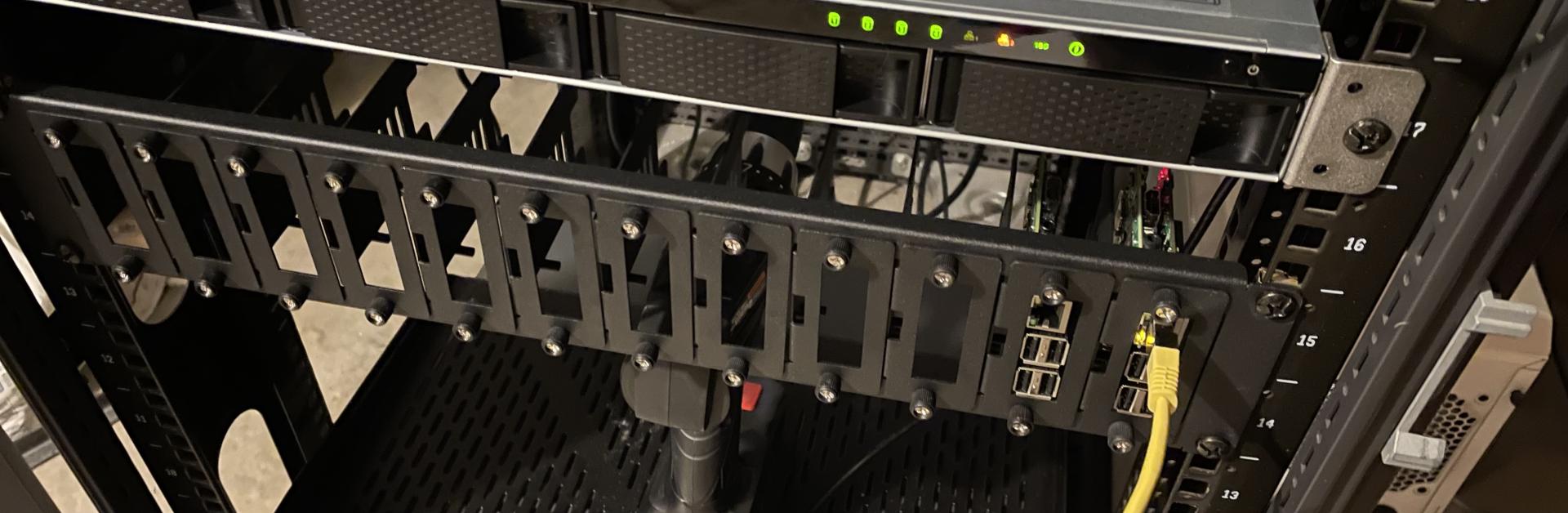
One additional benefit of doing this, and one of the considerations that made me switch back to Bind, was that I can easily set up an ad blocker again. This is something I had a long time ago and loved, but when I moved to CoreDNS I lost the feature. I poked at setting it up again, but there were never any great options for doing so, so instead I just left it out. Now, I can rebuild it and improve my privacy and security posture.
Improving PostgreSQL
The second area I looked at improving was PostgreSQL itself. I considered a few options for a rebuild:
- Running multiple PostgreSQL servers with replication
- Running PostgreSQL on Raspberry Pi, similarly to DNS
- Running PostgreSQL in AWS
There were trade-offs and implications with each of these such as cost, accessibility, hardware reliability, et cetera. What I eventually settled on was running a single PostgreSQL server in a VM with nightly backups to Wasabi (S3 compliant cloud storage). After the initial buildout of the new server, I also took the opportunity to make a few more improvements that was long overdue:
- Replaced the old Ubuntu Server 16.x VM with a sparkling fresh Centos Stream 8 VM.
- Upgraded from PostgreSQL 9 to PostgreSQL 13
- Integrate role authentication with LDAP
- Enable and enforce SSL
[~]$ cat /etc/centos-release
CentOS Stream release 8
[~]$ psql --version
psql (PostgreSQL) 13.7
I also embraced another idea I often evangelize: don't cut corners. If you're going to do something, do it correctly the first time. Again this idea is not unique to technology, but nearly all of us who work in this field have heard the phrase "we'll come back and fix it later". I went slowly and methodically to build the server correctly, and then I spent some time building automation and setting it up to dump my databases and upload them to Wasabi.

The result is a tar archive uploaded nightly, which contains dumps of each database on the server. If something happens, I can restore an individual database, or all databases to a previous snapshot in time relatively easily. Even if I were to lose the whole server (again) and have to rebuild fresh, the data is now secure in Wasabi.
Monitoring
The next improvement on my list was something that I'd been saying I should do for a long time: network-wide monitoring. This is something that could have saved me a lot of heartburn in many ways. With the proper setup and configuration, I could have been alerted of the fact that my data was on a RAID 0 array, or I could have been proactively alerted of the disk failing earlier. I could have been alerted of host failures, mis-configurations, and more giving me ample time to migrate my database and save it (then again, it was old and scrappy and had dodged numerous bullets before - maybe a rebuild was for the best?).
A long time ago, I used a tool called Icinga2 and a brief search showed it still being updated, healthy, and supported. I built a new server and set up Icinga2 and Icinga Web 2 (it's companion frontend), and then configured my hosts and their critical services for monitoring and alerting.
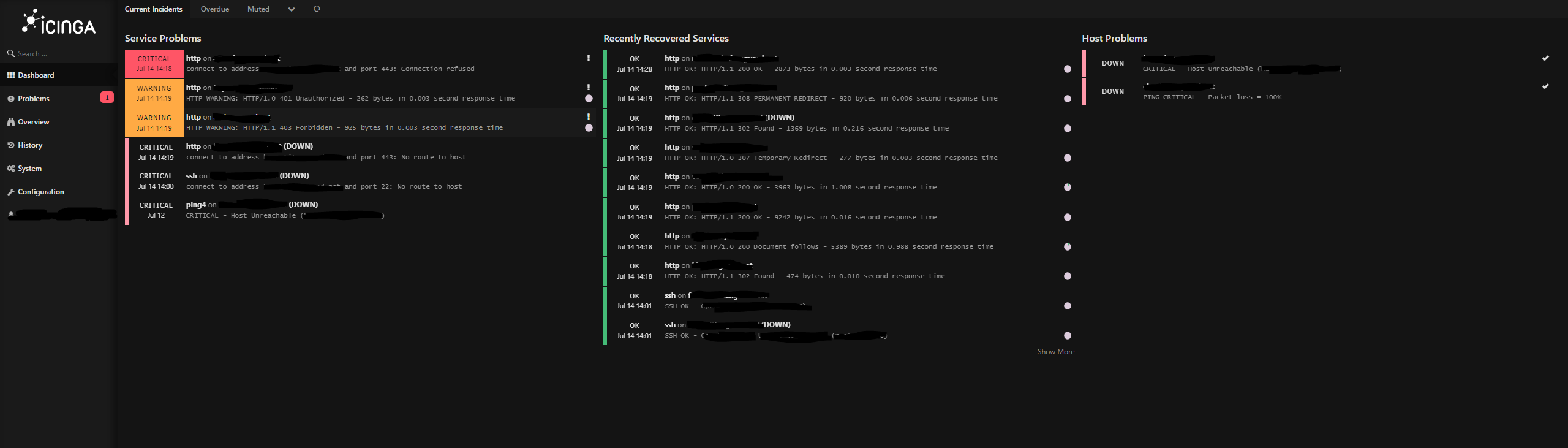

Icinga Web 2 lets you build customizable dashboards, so the next step for me in relation to monitoring will be to pick up a cheap tablet off of Amazon and mount it on the wall in my home office (and probably the game room, too) that displays a summary of any issues. Combined with Icinga's monitoring tools and it's ability to proactively send alerts via email, this will let me see any alerts relating to network, service, or hardware issues well before they become a problem. As an added bonus, in line with the idea of not cutting corners, I took the time to set up SSL, which is a standard I've decided to implement on any web-capable services going forward (because it's 2022 and this should be easy).
Source Control and KB
My source control server, and my knowledge base are both easier to recover for the infrastructure, but the data will take longer. The servers themselves are up to date and maintained, and I had automation keeping the respective applications updated with SSL enabled and renewing automatically, so in both cases the only "recovery" work needed at the infrastructure level is to point them to the new database server.
However, each of them used PostgreSQL liberally to manage metadata, which is now gone. So for source control, I'll need to manually re-create my repository structure and re-import all of my code. There are something like three hundred and fifty repositories accumulated over the last 10 years, so that's a pretty large effort. However, Gitea offers a convenient way of importing repositories from the local disk via it's administrative UI so the majority of the work here is just in clicking the button a bunch, which won't take long. The only real loss is in the repositories that were set up as mirrors; Gitea's import function does not reinstate the mirror configuration, so I'll have to reconfigure those manually to pull changes.
The Knowledge Base (WikiJS) was probably the easiest thing to recover, and is probably the only area where my disaster recovery functioned as expected. WikiJS stores article data in the database, and exported it using storage connectors. By default, the primary storage connector was the local disk, however I had disabled that and switched to git instead. The git connector exports data every five minutes; after re-importing the repository in Gitea, updating the database connection, and re-configuring the git connector, I was able to import my KB exactly as it had been at the moment of failure with a single click.
Unfortunately however, there's an added issue. My original Knowledge Base ran Atlassian Confluence (Server) on-premise. When Atlassian announced that their Server products were being discontinued, I decided to switch to WikiJS. As part of that, I had been in the slow process of moving from Confluence to WikiJS, which means that while the bulk of my data had been moved, it was still split (at least in part). Confluence had no such export configured; when I made the decision to switch, I made the (justifiable) decision to stop maintaining the Confluence server. As a result, the automation providing backups broke.
This presents the same dilemma as with the PostgreSQL server recovery attempts: The raw article data is stored as backups in S3. In theory, the final backup should be current for that server, as even though it is 1+ years old at this point, it was taken after I had stopped making changes. However, piecing that data back together would not be an easy task, and would require that I build a new Confluence server and figure out how to get it functional again, including building all the supporting infrastructure and learning the recovery process.
At some point, the cost of doing so for some notes that are probably outdated by now becomes too high to justify against the potential benefit - and that is further weighed against the fact that in the original migration, the most important things were moved first, meaning the stuff that hasn't been transferred isn't really all that critical. If I ever stumble across a strict need, the archives are there in S3 and I can rebuild the server relatively easily, but for now I'll likely just wash my hands of Confluence and move on with the data that was stored in the WikiJS backup.
Next Steps
Vacation is coming to an end, and for the most part the recovery is complete. I have a few closing thoughts on everything in general, as well as what happens next.
The risk of losing so much critical knowledge was scary, but this is the point of having a lab: these things should happen in an environment that doesn't impact jobs, money, or the survival of a business or organization so that when you're making decisions that do, you can make them wisely based on what you learned. In this case I learned that experience and knowledge isn't a shield against "I'll come back to this later."
The original issue steps from the RAID 0 configuration. My best guess for why I did that is that I probably got the new server in before I got the drives, and needed the compute capacity. So I decided to set up RAID 0 with the disks I had and move on, intending to come back and fix it when the rest of the drives arrived later. Despite (or perhaps because of?) my knowledge, experience, and technical skill, I made the decision that I could take a shortcut and be fine. Fast forward to now and you can see how well that worked.
Lesson learned.
Most of what happens next will be slow and steady cleanup as I continue moving things back to where they need to be, and improving the health and hygiene of my environment. But there are a few specific changes I'm going to make to how I handle the environment going forward:
- Monthly patching of all hosts - I'll do this by hand until I have time to write a playbook for it, but eventually I'll automate it.
- Backup all critical data to Wasabi, and automate those backups on a regular schedule before the service using that data starts being used.
- Don't do quick and dirty changes; when I build something new, don't consider it done until a patching and backup process is defined, built, and automated.
- Expand monitoring to cover all possible use cases for things, and to automate the addition and removal of hosts so that I have full visibility into my infrastructure.
- Decommission old hosts and replace them with new ones that fit into the update and management life cycle for my environment.
Despite the risk and work (and the fact that this happened over vacation time) I'm glad it happened; true failures are the best learning experiences, and the things I'm learning from this will make everything I build better in the future.