I recently ran into an interesting problem with Jenkins which I thought was fitting for a write-up: shared pipeline development. This is probably an edge case, and I won't claim to have nailed the exact perfect solution to it, but hopefully by putting my thought process down on paper, someone searching for this sort of thing in the future may one day benefit.
Use Case
Like a lot of places, we use Shared Pipelines in Jenkins to re-use code. And, like most (many? some?) places, we have standards and a style guide for each of the languages we use for production-facing workloads (including automation pipelines). Additionally, we use global implicit imports for some of our ubiquitous pipeline code, so we require code reviews and such before a change gets promoted. None of this is unusual or crazy, but it does mean that we have a need to do some pretty standard/common things with our shared library code:
- Store it in source control (git).
- Use a branching strategy for fixes and feature additions.
- Conduct tests and sanity checks on the library code before it goes into the
masterbranch.
For almost all of the code most people will write, this is a quick scaffolding effort and you're off to the races. But for this specific scenario - shared pipeline usage with an implicit import, where the CI solution for a piece of code is impacted by the code itself, this prevents a very unique sort of problem.
Loading Libraries
In trying to form a problem statement, I realized that it was important to understand a little more about the way that Jenkins manages shared libraries. The documentation is pretty good here, so I won't bother with 101-level definitions, but I discovered that there were some interesting nuances to the behavior of libraries depending on how you implement them.
First, the actual import behavior of Jenkins is dependent on the way that you import a library - something that is not readily apparent if your mindset is "I have a thing I want to use, and Stack Overflow says to do x". Consider for example, using the library as a Global Pipeline Library:
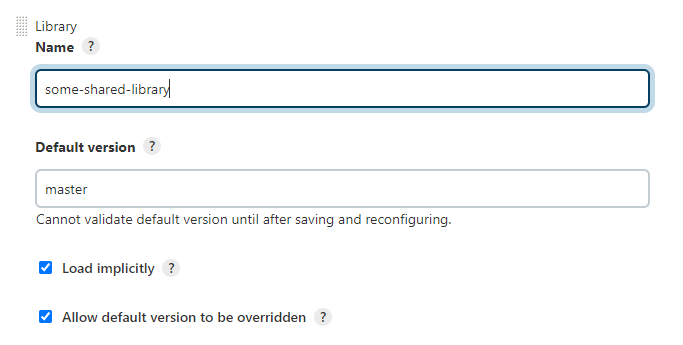
By doing this, you configure the library to be available for every pipeline (i.e: "globally"). In this configuration dialog there's a checkbox which specifies whether to Load Implicitly. If you select this option, one of the first steps in each pipeline that executes is that Jenkins will load this library from SCM and make the code within available to your pipeline.
...
Loading library some-shared-library@master
...
Fetching upstream changes from git@my.git.server/some-shared-library.git
 ...
[Pipeline] Start of Pipeline
If you don't load implicitly, you need to explicitly import the library with a @Library annotation, or dynamically with a library workflow step.
# Using the annotation
@Library('some-shared-library') _

# Using the library pipeline step
library 'some-shared-library'
Just to reiterate - a key point of all this is that the way you import a library (Implicit versus Explicit versus Dynamic) matters.
- Implicitly loaded libraries are loaded during pipeline initialization, before the start of the pipeline
- Explicitly loaded libraries are also loaded during pipeline initialization
- Dynamically loaded libraries are loaded during the pipeline step in which they are called.
This will be relevant later on.
Library Versions
Another key concept to be familiar with is that of library versions. For the sake of simplicity, a library version is a branch, such as master, dev, etc. When you configure a shared library, you configure the "default" version, usually master. You can optionally allow this version to be overridden if needed.
# Load the default version
@Library('some-shared-library') _

# Load the 'dev' version
@Library('my-shared-library@dev') _
library 'some-shared-library@dev'
The Problem
With an understanding of the basic principles of shared pipelines out of the way, you can start to identify a few of the components of this problem:
- In git, the default branch of the library must be "clean" (meaning, the code has been reviewed, tested, etc).
- In git, development work must happen on non-master branches with names which are arbitrary and impossible to predict (for example, because they incorporate seemingly random request numbers/ids).
- In git, development work must pass review prior to promotion to the master branch.
- In Jenkins, using a shared library requires that you define a default version.
- In Jenkins, we load some libraries implicitly.
A passing attempt at forming a problem statement might look like:
A condition exists in which we need to override the default version of a shared library being loaded. Since development work happens in a non-master branch, but implicit loading defaults to master, we must override the version of the library being loaded.
With a clearer understanding of what we're trying to do, we can start to tinker.
Setup
For this, I opted to set up a basic test harness of a pipeline that runs an extremely simple shared library. The library looks like this:
.
├── vars/
│   └── foo.groovy
└── pipeline.jenkinsfile
foo.groovy only contains one method:
def call() {
    echo "bar"
}
pipeline,jenkinsfile is equally simple. Remember, we're just setting up a basic testing and development environment.
pipeline {
  agent any

    stages {
        stage('Do foo') {
            steps {
                script {
                    foo
                }
            }
        }
    }
    post {
        always {
            cleanWs()
        }
    }
}
Finally, configure our pipeline in Jenkins as a global pipeline, implicitly loaded.
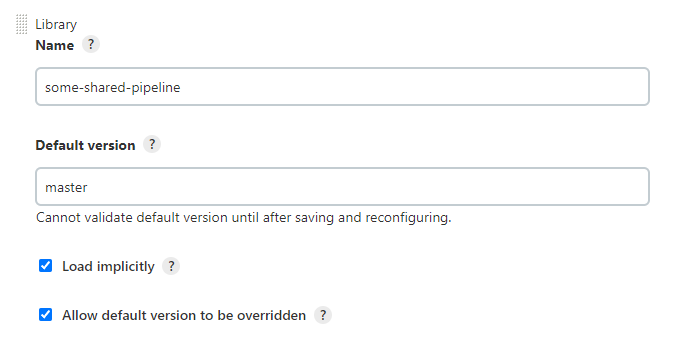
Now, when the pipeline runs we should see our library being loaded and the foo() method being called.
...
Loading library some-shared-library@master
...
[Pipeline] { (Do foo)
Development
Now that everything is set up, the next step is to mimic development work to add a new feature. To do this, a new branch is created in the library repository. Let's call it ticket-1234 to mimic the name of a branch that is implementing a feature defined in a ticket somewhere.
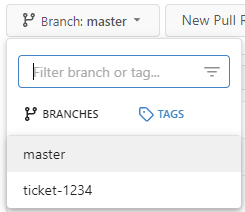
Next, re-scan the multibranch pipeline refs to pick up the new branch.

After running a build on the ticket-1234 branch:
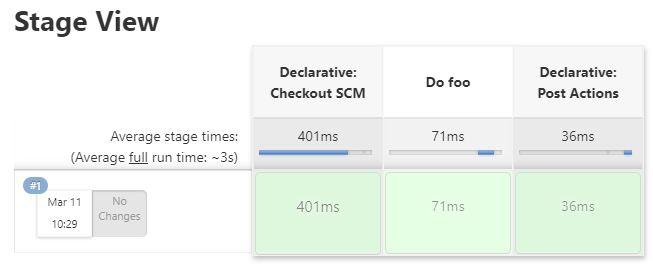
Cool - all green means good, right? But hang on. Let's look closer at the logs:
Loading library some-shared-library@masterRemember, the whole point of doing this is so that we can test changes to the ticket-1234 branch before they go to master. Since Jenkins is still loading the master version of the library, we're not actually doing that.
We need it to load the ticket-1234 version instead. To do that, we could go back to the configuration and modify the default version to specify ticket-1234, but then that version would be loaded for all pipeline executions globally, and we don't want that. So instead, we can look at overriding the pipeline version with an annotation:
# pipeline.jenkinsfile
@Library("some-shared-library@ticket-1234") _
pipeline {
...
}
Let's push these changes to the ticket-1234 branch and run it.
...
Loading library some-shared-library@ticket-1234
...
Now it's loading the ticket-1234 version instead of master. But this introduces a number of issues in itself, which contribute to poor code hygiene and technical debt.
For starters, we've explicitly defined ticket-1234 as our library to load. But what happens when we move to ticket-1235 or ticket-1236? Do we need to change the code every time to point to the new branch (yes)? How does that work if we have multiple versions in development at once? Does each version need to define all of these @Library annotations, or do we just accept that we will have to deal with a conflict when we merge the code into master?
And by the way, what happens when you merge the code into master? Do those @Library statements stay? Or do they get removed? If they get removed, then you need to make changes to the code after it has been reviewed and accepted, which violates the principles of source code management:
- When development is complete, you need to review.
- After review, you need to remove the library annotation artifacts
- If you make changes after review, you need to review and test again.
- To review and test, you need to run the code.
- To run the code, you need to re-add the library annotation statements
Around and around it goes. The only way to break that cycle is to leave an ever-growing list of import statements (bad) or to not review after they are removed (also bad - what if you break something by removing the wrong statement?). There is almost certainly a better way to do this.
Variables
Luckily, Jenkins provides something we can possibly use here. You can get the name of the current branch with the ${env.BRANCH_NAME} variable.
# pipeline.jenkinsfile
...
sh "echo ${env.BRANCH_NAME}"
...
Results in:
[Pipeline] sh
+ echo ticket-1234
ticket-1234
Neat, this has potential. Let's tinker some more:
# pipeline.jenkinsfile
@Library("some-shared-library@${env.BRANCH_NAME}") _
Results in:
WorkflowScript: @Library value ‘some-shared-library@$env.BRANCH_NAME’ was not a constant; did you mean to use the ‘library’ step instead?That's no good.
It turns out, you can't use variables with the @Library annotation. The reason for this is due to the fact that annotations are not computed. As a way to explain this, imagine a method add() that adds two values, and is called as such:
add(1, 1)

# output
2
The output of that method is computed at runtime to determine its value based on the arguments provided.
Annotations however are not computed; rather, they exist only to provide metadata or instructions to the groovy compiler which builds your pipeline prior to execution - with an emphasis on the words prior to execution. In this case, the @Library annotation instructs the compiler to make that library available to the resulting program (your pipeline), but that step happens before the pipeline is executed. Once your pipeline starts running, which is when the variables are populated, anything specified in annotations (including @Library statements) has already happened and cannot be changed.
Dynamic Loading
Lucky for us, the library workflow step exists and can be used to load libraries at runtime. This means we're able to do things like this:
library "some-shared-library@${env.BRANCH_NAME}"Let's make our change and run it again:
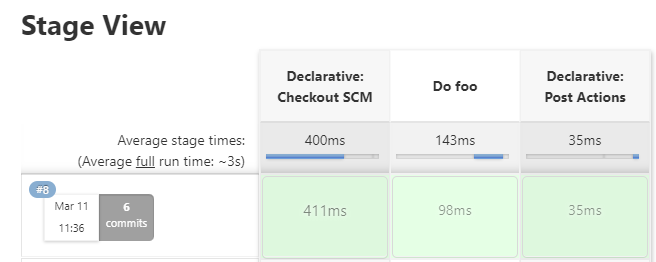
Looks good. Let's check the logs:
...
# implicitly load the master version
Loading library some-shared-library@master
...
# pipeline start
[Pipeline] Start of Pipeline
...
# the `library` step loads the some-shared-library@ticket-1234 version
[Pipeline] library
Only using first definition of library some-shared-library
...
Oops.
What happened here is that we implicitly loaded the some-shared-library library, and then tried to load it a second time as another version. Jenkins won't allow this to work, since it would probably break things in a pretty horrible way.
So now the original problem is a little bit clearer: we can't really put tons of @Library statements in our code to account for all these branches, nor can we add and remove them arbitrarily without breaking our processes around code hygiene, which we don't want to do. We also can't load the library dynamically, since we're also loading it implicitly and that initial load won't be overridden.
The crux of this problem comes down to two main factors:
- We can't predict the name of the version we want to load
- We can't override the initial implicit load.
Solutions
One possible solution is that we can add a dev branch which allows us to do a couple of things:
- Predict the name of the branch where our development code will live.
- Override
masterusing annotations.
However this doesn't get us around the fact that if we add a some-shared-library@dev annotation, we have to then remove it before that code is pushed to master. Otherwise, we will have a production pipeline pointing to a dev version of the library, which is no good. This leaves us with a few possible solutions, none of which are directly compatible with the existing development model. We could add a second global library definition in Jenkins with a different name, which points to the dev branch as it's default version. We don't need to implicitly load this since it's only relevant for a single pipeline - the one where we conduct tests and validation.
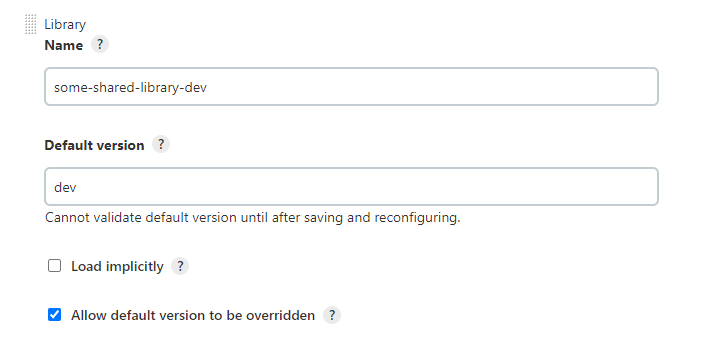
This gets us around the issue of not being able to load different versions of the same library multiple times. We're now loading two different libraries instead, which happen to reference the same source code. This feels like it adds complexity and isn't really an intuitive solution, so I don't really like it. Another option is to do development of the pipeline on another Jenkins instance which does not have the library configured, such as a non-production instance. I don't like this option either, for the same reason - it's probably functional, sure. But it's complicated and messy.
At this point, the two best options in my opinion require that you rethink how you are using shared libraries. Specifically, they require that you not implicitly load things. There are plenty of good arguments for and against implicit loading. I think the value of it is situational, but in this case the implicit load is causing our issue. To get around it, you can do one of two things:
- Don't load your library implicitly. If it does not load implicitly, there is no version conflict and dynamic loading will work.
- Load implicitly, but do so at some point in the hierarchy other than global. For example, load the library implicitly, but only for all pipelines within a
productionfolder. This would let you exclude the development pipeline, and solve the problem.

This may introduce it's own problems, but I like this option best for a couple of reasons:
- You can easily script the configuration of any new "production" folders to add your pipeline configuration.
- You retain the flexibility of working on your pipeline on your existing production infrastructure, without constraints.
- Having code that runs in every pipeline can be dangerous and lead to a bottomless pit of errors and unintuitive behavior.
The entire exercise has helped me identify a couple of things I didn't understand about Jenkins before, such as the compilation vs runtime behavior of annotations and the library step. It's also helped me frame the risks and issues associated with global shared library code, which in turn has provoked new thoughts on whether the things we're doing are smart, and whether they need to change. And at the end of the day, that's the important trait: iterative, constant improvement.
The things we do don't always have to be perfect, and expecting that they will be is unreasonable. But we can always do them with a mindset of finding ways to improve the hygiene of our code, our processes, and our pipelines. Even if I got nothing else out of doing this, it prompted me to consider how we are using global shared libraries, and that will lead to improvements down the road.